
 Slack Integration
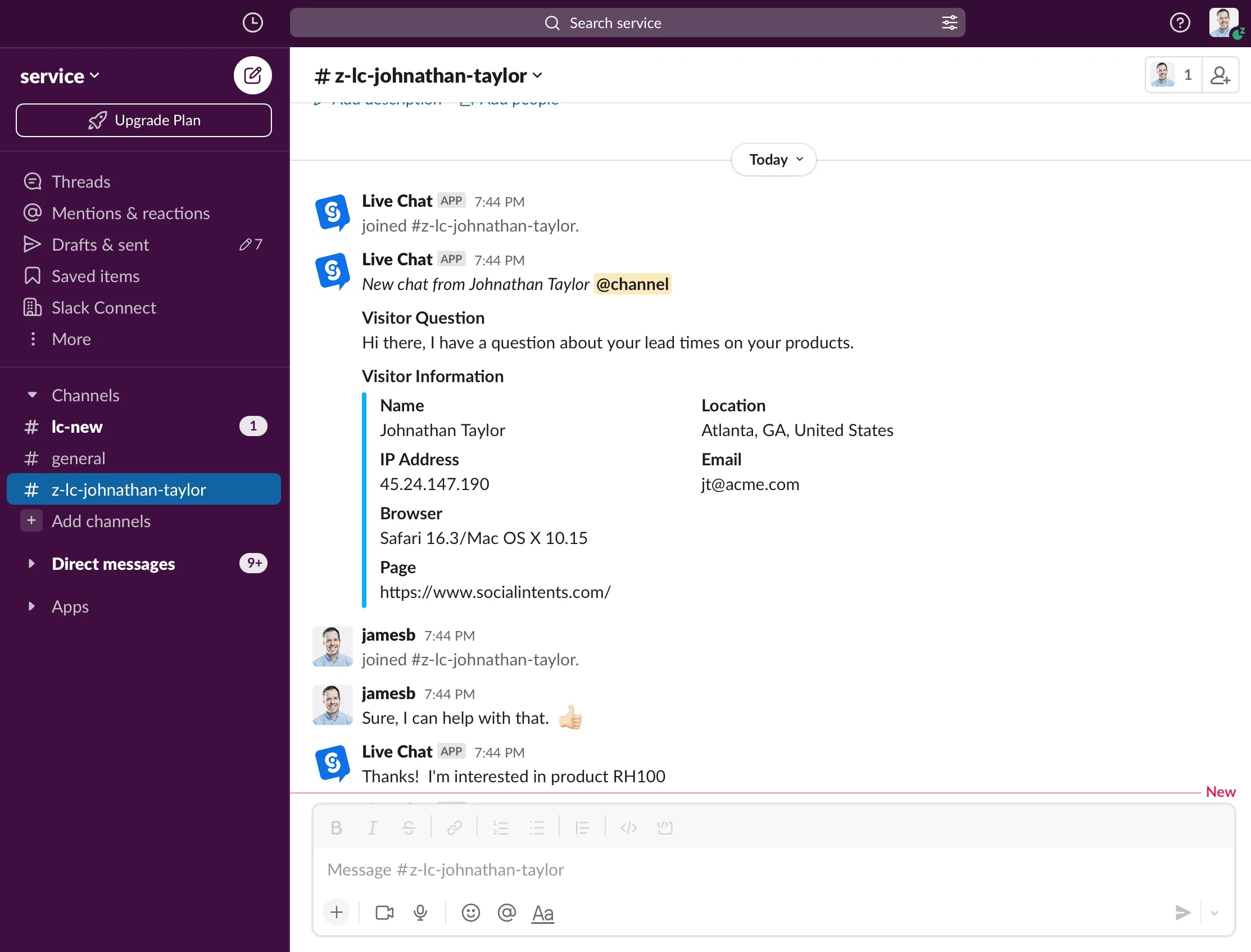
Slack Chat Widget for Your Website
Social Intents is a live chat and AI chatbot platform that enables businesses to provide customer support directly from Slack. Add our Slack Chat Widget to your website and chat with visitors in real-time from your Slack channels.
- Chat from Slack. No extra apps needed
- AI chatbot handles FAQs, humans handle complex issues
- Dedicated channels or threaded conversations
14-day free trial • No credit card required
#customer-support
Why Slack Chat Widget?
Slack is where your team already collaborates. Keep customer conversations flowing without switching apps.
Channels or Threads
Give each chat its own channel, or use Threaded Mode to keep conversations as threads in one channel.
Slash Commands
Use /livechat commands for quick responses, status changes, and canned replies.
Profile Photos
Your Slack profile photos and names show up in chat. Personal, professional support.
How It Works
Get started in 3 simple steps. Most teams are live in under 5 minutes.
Connect Slack
Click "Add to Slack" and choose the public channel you want to receive chat requests in.
Add to Slack
Embed Code Snippet
Add a single line of JavaScript to your website, or use our plugins for WordPress, Shopify, BigCommerce, or Wix.
Start Chatting from Slack
Receive chat requests in your channel. Choose dedicated channels for each chat, or enable Threaded Mode to keep conversations as threads.
Slack Live Chat Features
Everything you need to provide exceptional customer support from Slack.
Custom Chat Widget
Match your brand with custom colors, logos, text, and styles. Full customization control.
AI Chatbot Integration
Add ChatGPT, Claude, or Gemini to handle common questions. AI escalates to humans when needed.
Unlimited Team Members
No per-agent pricing. Add your entire team without worrying about seat costs.
Slash Commands
Use /livechat commands for canned responses, status changes, and quick actions.
Proactive Chat Invites
Automatically invite visitors to chat based on page, time on site, or custom triggers.
Targeting Rules
Show different chat widgets based on page URL, visitor behavior, or custom conditions.
Time of Day Rules
Automatically set online/offline based on business hours. Show offline form after hours.
Analytics & Reports
Track chat volume, response times, satisfaction scores, and export data for analysis.
Zapier Integration
Connect to 5,000+ apps. Send leads to your CRM, create tickets, update spreadsheets.
Real-World Examples
How Teams Use Slack Chat Widget
From startups to enterprises, teams across industries use Social Intents to connect their website visitors directly to Slack. Here's how different teams leverage this powerful integration.
Technical Support from Slack
Software companies use the Slack chat widget to provide instant technical support without leaving their development workflow. Engineers can answer customer questions between sprints, share code snippets, and escalate issues to the right team members—all from Slack.
- AI handles tier-1 support: ChatGPT answers common questions about documentation, pricing, and features automatically
- Engineers stay in flow: Technical questions route to #dev-support channel for quick resolution
- Bug reports captured: Use Zapier to automatically create Jira tickets from chat conversations
Convert Shoppers into Customers
Online stores use Slack chat widgets to answer pre-sale questions instantly, reducing cart abandonment and increasing conversion rates. The AI chatbot handles shipping inquiries and product questions while sales reps close deals.
- Reduce cart abandonment: Proactive chat invites on checkout pages catch hesitant buyers
- AI answers instantly: Shipping times, return policies, and sizing questions handled 24/7
- See visitor context: Know which product page they're viewing and their cart contents
Manage Multiple Client Websites
Agencies deploy Slack chat widgets across all their client websites, routing each client's visitors to dedicated Slack channels. One dashboard manages everything while clients get white-labeled chat experiences.
- Separate channels per client: #acme-support, #globex-sales, #initech-leads—organized and searchable
- White-label branding: Each widget matches the client's brand colors and logo
- Train AI per client: Custom knowledge bases ensure accurate, brand-specific responses
Capture Leads & Book Consultations
Law firms, accounting practices, and consultancies use Slack chat widgets to qualify leads and book appointments automatically. The AI chatbot collects requirements while professionals focus on billable work.
- Qualify leads automatically: AI asks about case type, budget, and timeline before routing to team
- Book appointments: AI Actions connect to Calendly to schedule consultations instantly
- After-hours coverage: Never miss a lead—AI handles inquiries 24/7 and books for next business day
Trusted by Teams Who Live in Slack
Join thousands of companies providing better customer support from Slack
Frequently Asked Questions
Yes! If you've already signed up for Social Intents separately, simply go to the Integrations link once logged in to enable the Slack integration.
If you've chosen a Private channel when setting up the integration, we won't be able to send messages. Either use a Public channel, or invite our Chat Bot to your Private channel by typing /invite @livechat in the channel.
In Slack, go to Apps & Integrations from the top-left menu, then 'Manage' on the top right. Choose 'Live Chat' then 'Remove App'. Now click 'Add to Slack' to re-add the app and select your new channel.
You can set up an online/offline schedule in your chat settings. You can also use slash commands: "/livechat online", "/livechat offline", or "/livechat status" to manage availability directly from Slack.
Yes! You can create multiple chat widgets and set up a different Slack channel for each one. Simply run through the Slack setup from within each widget's settings.
In your active chat on Slack, type /livechat into the message area to see all available commands. You can send canned responses, change status, transfer chats, and more.
Ready to Chat from Slack?
Join 50,000+ teams using Social Intents. Start your free 14-day trial today.